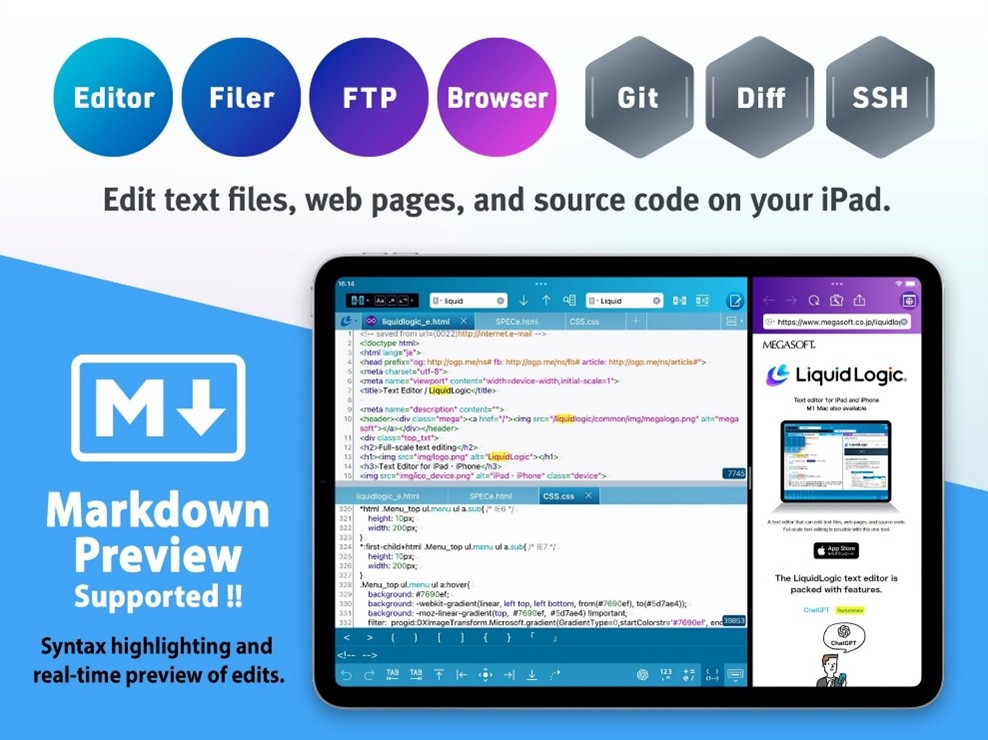
Megasoft Inc. (Head Office: Osaka, Japan; President: Yoshiaki Imachi) has released the latest version of its iOS text editing app “LiquidLogic,” originally launched in May 2019, now featuring Markdown preview functionality.
LiquidLogic was released in May 2019 as a high-performance text editor for iPad/iPhone that includes a file manager and FTP functionality, allowing users to edit files on the cloud and servers, and also offers web previews via a dedicated browser. It is distributed in 36 countries and regions worldwide, has reached approximately 188,000 downloads, and has received a high user rating of 4.6 out of 5 stars (1,241 reviews). Since then, LiquidLogic has steadily expanded its features and user base with additions such as an SSH terminal, Git version control, file comparison, ChatGPT functionality, and English language support.

https://apps.apple.com/jp/app/id1458566442
About the Text Editor “LiquidLogic”
LiquidLogic is a versatile iOS text editor suitable for everything from casual note-taking to professional use.
It supports syntax highlighting for 15 programming languages, including HTML, Markdown, XML, CSS, JavaScript, PHP, Perl, Ruby, and C++. It also features search, replace, and grep functions compatible with Perl regular expressions, enabling flexible text editing.
The app integrates with iCloud, Dropbox, Google Drive, and OneDrive, allowing seamless collaboration with desktop environments. With built-in file management, FTP, and web browser functionality, users can even edit web pages on the go.
Additionally, LiquidLogic includes professional-grade features such as file comparison, SSH terminal access, Git version control, and ChatGPT-powered AI functionality.
New Feature: Markdown Preview Support
Markdown is a lightweight markup language that uses simple symbols (such as # and *) to easily format headings and lists. Its readability as plain text makes it widely used for development documentation, notes, articles, and web content creation.
With the growing use of AI for code generation and documentation, Markdown has become increasingly important as a format that is easy for both humans and AI to handle.
Until now, many users have requested preview and language support for Markdown files, similar to HTML support in LiquidLogic.
In this update, LiquidLogic introduces:
A real-time preview feature that displays Markdown content as you edit
Syntax highlighting to visually distinguish Markdown elements
This allows users to check both the source text and rendered output simultaneously, making Markdown editing on iPad and iPhone more efficient and comfortable.
Key Features
Markdown File Support
Markdown (.md, .markdown) has been added as a supported format. Syntax highlighting improves readability by visually distinguishing elements.
Real-Time Preview
Tap the preview icon in the editor to display the rendered Markdown.
Preview can be shown on the right, above the editor, or in a browser.
Changes are reflected instantly, enabling efficient editing.
Editing Toolbar
An “editing bar” allows quick input of commonly used Markdown symbols and brackets.

Features previously only available in HTML files can now be used in Markdown, making editing in markup language format more convenient.
Distribution Overview

Paid Version / In-App Purchases
A paid version with extended functionality is available via in-app purchases for users who want to use LiquidLogic as their main editor.
Key differences:

Product overview
Application name:LiquidLogic Ver.3.3.0
Release date:March 24, 2026(Tuesday)
Operating environment:
Supported devices: Apple iPad, iPhone, Mac with Apple Silicon
Supported OS: iOS 17.7 or later
Planning,development and distribution:MEGASOFT Corporation(https://www.megasoft.co.jp/company/)
Distribution method:Download from App Store https://apps.apple.com/app/id1458566442
Product Support page:https://www.megasoft.co.jp/liquidlogic/index_en.php
Contact point (for users):https://www.megasoft.co.jp/cgi-bin/support/liquidlogic/cgi/form.pl
Contact point (for media):[email protected]
*The company names and product names listed on this page are registered trademarks or trademarks of their respective companies